How to: Sales Stages
Last updated: July 15, 2026
Customizing your sales pipeline
Creating Sales Stages in First Bite
In First Bite, your sales pipeline is more than just a list of deals, it’s a visual representation of your relationship with the customer over time. Each stage in your pipeline reflects where that relationship currently stands, helping you and your team take the right next steps to move it forward.
Sales stages should mirror your real-world sales process — from initial contact to a closed deal — and give everyone a clear understanding of how engaged the customer is at each point.
Why Sales Stages Matter
Your pipeline stages help you:
Track progress in your customer relationships.
Prioritize work by identifying which deals need more attention.
Forecast revenue based on where deals are in the pipeline.
Create consistency in how your team defines and moves deals forward.
Before You Begin
Before creating sales stages, it’s helpful to:
Define your customer journey — List the key relationship milestones from first outreach to final agreement.
Identify deal triggers — Decide what needs to happen for a deal to move from one stage to the next (e.g., a meeting booked, a proposal sent, a trial completed).
Keep it simple — Too many stages can overcomplicate tracking; aim for 5–7 clearly defined steps.
How to Create Sales Stages in First Bite
Go to Settings > Platform > Sales Stages
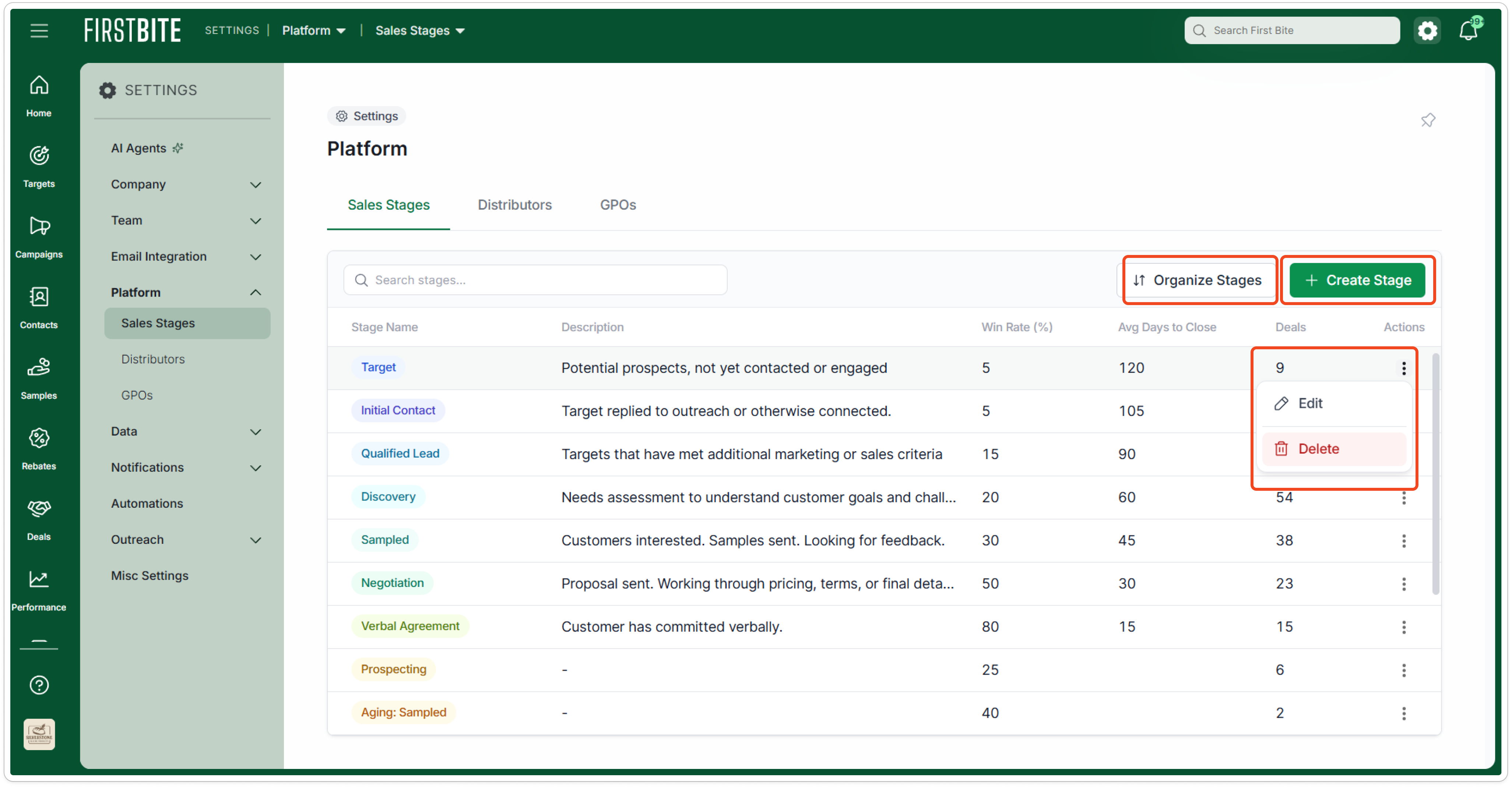
Edit or delete stages by clicking the the 3 dots under the Actions column.
“Closed Won”, “Closed Lost”, and "Churn" cannot be edited as they factor in to forecasting.
Create a new stage by clicking
Create Stage.Enter the following:
Stage Name - Should clearly describe the relationship status (e.g., Intro Call Scheduled, Sampling in Progress, Verbal Agreement).
Win Rate (%) - Percentage of this sales stage that you expect result in a win.
This will play a role in forecast calculations. If you’re not sure of the value, you can estimate.
Average Days to Close - Average number of days from that sales stage to close.
Description - Clarify any details about the stage (e.g., what is required to reach this stage)
Color - Choose a color (optional)
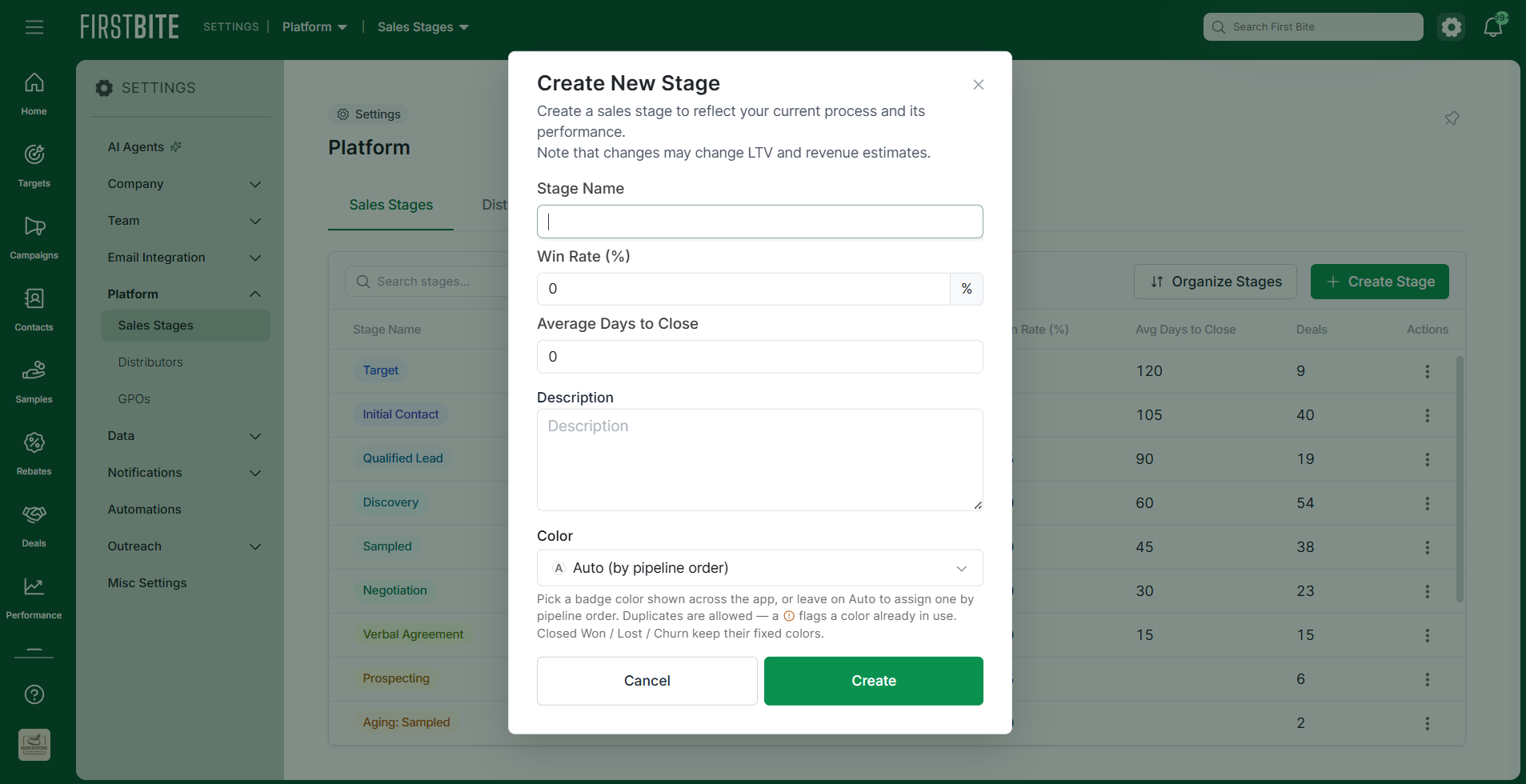
Click
Createto finish creating the sales stage. This stage will now appear in your list and be available to select down in your deal creation.Once you've created the stage, you can adjust the order of your sales stages by clicking
Organize Stages.The default order of sales stages is based on the number you enter for "Average Days to Close".
Best Practices for Effective Sales Stages
Use customer-focused language — Label stages based on what’s happening in the relationship (e.g., Evaluating Product vs. Sent Follow-Up).
Be consistent — Ensure everyone on your team uses the same criteria for moving deals between stages.
Review regularly — Adjust stages as your sales process evolves.
Example Sales Pipeline
New Opportunity – Identified a potential customer, no contact yet.
Initial Contact – First outreach or meeting scheduled.
Discovery / Needs Assessment – Understand customer goals and challenges.
Sampling or Proposal – Product trial or formal proposal delivered.
Negotiation – Working through pricing, terms, or final details.
Verbal Agreement – Customer has committed verbally.
Closed Won – Agreement signed, ready for onboarding.
Closed Lost – Opportunity will not move forward.
By designing your sales stages around the relationship journey rather than just internal tasks, you create a pipeline that reflects real-world customer interactions. This approach ensures your pipeline stays accurate, dynamic, and customer-focused, helping you prioritize your relationships, forecast actual buying readiness, and increase win rates by aligning your actions with the customer’s decision-making process.