Best Practices: Tags & Contact Labels
Last updated: September 17, 2025
Tags and contact labels in First Bite are essential for organizing data, segmenting accounts, and enabling smarter outreach. But without structure, they can quickly become cluttered and inconsistent. This guide shows you how to use tags and labels effectively, standardize naming conventions, and integrate them into team workflows for cleaner, faster reporting.
The Difference Between Tags & Contact Labels
Element | Tags | Contact Labels |
Applied To | Companies | Contacts |
Used For | Organizing accounts by traits, campaigns, and activity | Classifying individuals within accounts |
Examples |
|
|
For the purposes of this article, tags and labels will be referred to interchangeably because their roles are very similar within First Bite.
Edit or review your tags and contact labels in First Bite’s Tags Settings or Contact Label Settings.
Key Features
Customizable: Create tags for any workflow.
Searchable & Filterable: Power fast lookups and reporting.
Color-Coded: Add visual structure to your CRM.
Multi-Tag Support: Add more than one tag to a record for flexible grouping.
Common Use Cases
Segmentation
Group records by shared traits:
Cold Outreach: June 2025VIP Customers,Newsletter Subscribers,Referral: Broker
Campaign Management
Targeting:
Top 100 Targets,Coffee ChainsTracking:
Status: Replied,Awaiting ContractGrouping:
June 2025 Campaign,Rebates Trial Group
Personalization & Customization
Interested in Sustainability,Avoid FridaysSales Objection: Price Concern,High PriorityFrequent Issue Reporter,Lead from Webinar
Reporting & Ownership
Owner: Jane DoeProduct: Private Label,Region: MidwestTag active customers to filter for upsell campaigns
Examples:
Tag leads as
High Priorityto focus on them first.Tag customers who attended a specific event as
Event2025for targeted follow-up.Tag contacts with
Frequent Issue Reporterfor context during interactions.Give specific colors to First Bite accounts to easily identify who owns which tags/company.
Tag companies in a campaign based on product interest, such as
Premium,Private Label, orClean Label.Tag Known Current Operators so you can filter them out for cold prospecting campaigns OR filter in to upsell more products to current partners.
Tag opportunities with your name if they fall within your sales territory.
Tag companies with sales objections such as
Objection: Price Concernsso you can circle back if a new pricing structure is created.
Best Practices for Tagging
1. Create a Tagging Guidelines Document
Set up an internal wiki or shared doc that includes:
A list of approved tags, organized by category (e.g., Campaign, Product Interest, Status)
Naming rules (e.g.,
Campaign: June 2025, notJune Campaign)Tagging permissions: who can create/edit tags
Tag definitions: clear rules about when a tag is needed
Ask yourself:
“Would I want to pull a report for this later?”
If yes, it probably deserves a tag.
Avoid tags that:
Duplicate existing tags or CRM fields
Are too vague to be useful (e.g.,
Misc,Follow-up Soon)
If transitioning from another CRM or tracking method, review your old system to inform your tag structure.
2. Use Prefixes and Colors for Clarity
Prefix | Example |
|
|
|
|
|
|
|
|
|
|
|
|
Avoid messy variations like: Webinar, webinar, June Webinar, Q2 Webinar
First Bite also offers color variation for both tags and contact labels.
Color code by prefix, user, campaign, etc.
3. Restrict Tag Creation
To avoid duplicates:
Limit tag creation to team leads or admins
Or implement a request process (e.g., Slack, form) for review
4. Make Tagging Part of Daily Workflow
Include tags in onboarding checklists
Include a “Tag this account” step in campaign launch checklists
Check tags during pipeline reviews
Add tagging instructions to your CRM playbook
5. Clean Up Tags Regularly
Run quarterly audits to:
Merge or delete duplicate tags (e.g.,
Plant-Based,plant based)Remove outdated campaign tags
Reclassify or rename for consistency
6. Use Tags for Smarter Reporting
Build saved views filtered by tag
Create dashboards segmented by tag groups
Measure campaign impact using tag-based reports
Tag Naming Examples
Category | Naming Convention |
Campaigns |
|
Engagement Status |
|
Product Interest |
|
Sales Rep Ownership |
|
Account Priority |
|
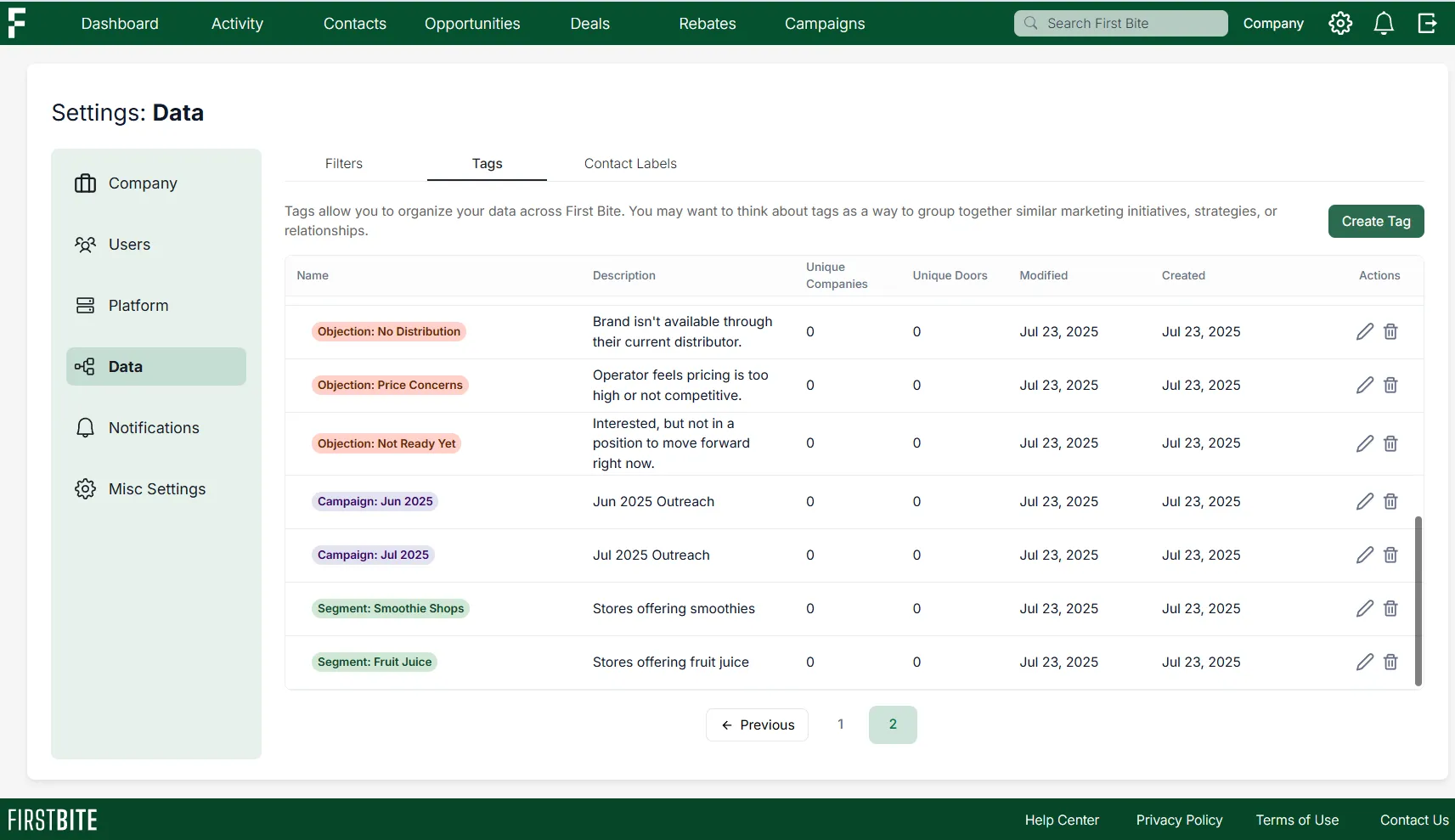
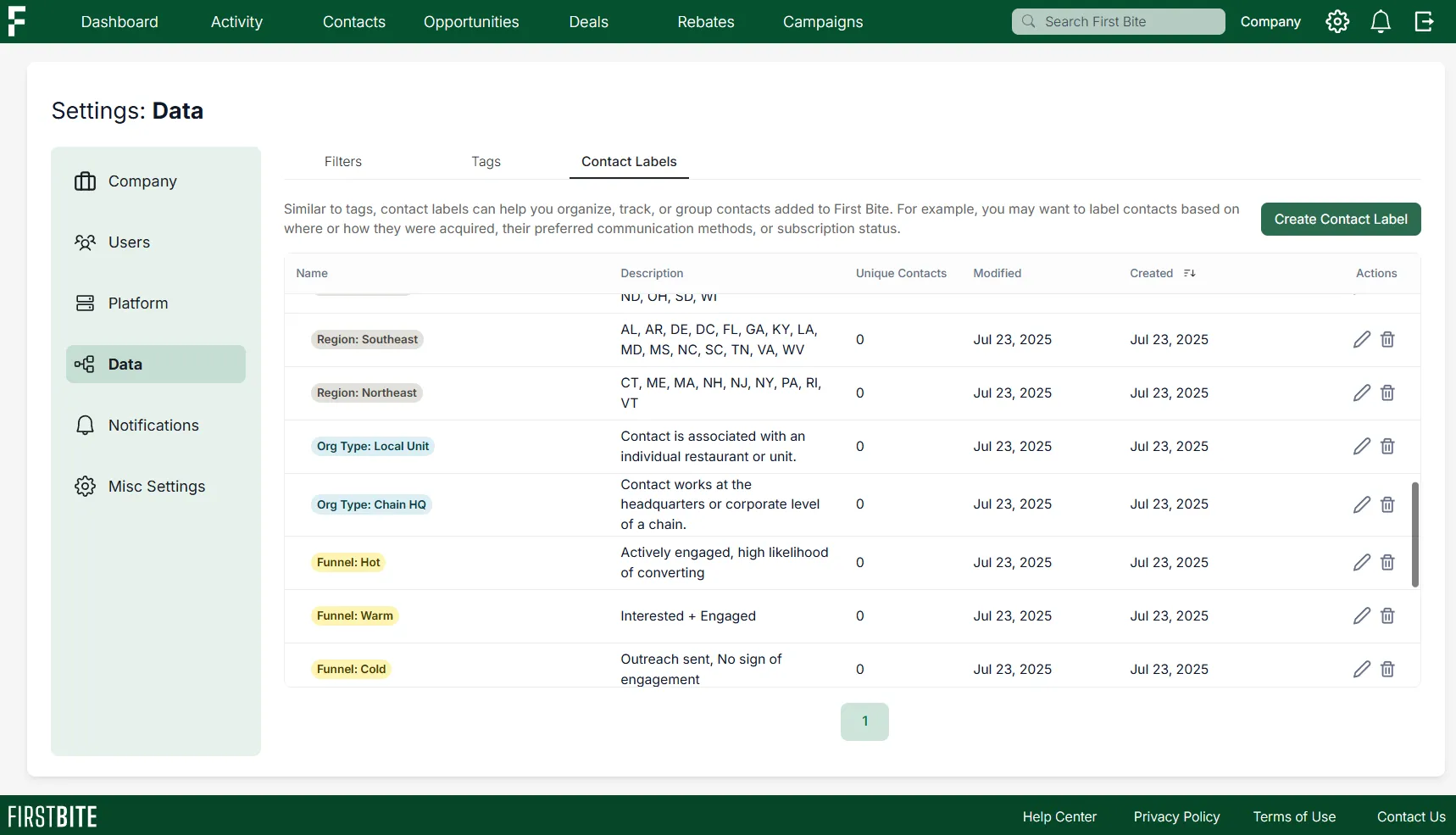
Examples In First Bite: Each tag contains naming convention, color coding, and clear descriptions.
Tags
Contact Labels
Additional Notes
Avoid creating vague or duplicate tags like
MiscorFollow-up Soon.If tagging by sales rep (e.g.,
Owner: Jane Doe), note that you won’t be able to use the “No Tags” filter to identify unassigned records.For workflow automation or advanced filtering strategies, talk to your First Bite representative.
If you have any additional questions or want to schedule a call, reach out to your First Bite Success team at success@firstbite.io .